

When a threat unfolds inside a school, a teacher has one job: alert someone without making things worse. Yet most schools still hand staff a mobile app and call it a safety plan.
Here is the problem: in a real emergency, pulling out a phone, waking the screen, finding the right app, navigating to the alert button, and sending — that sequence takes between 4 and 6 steps. For a teacher in a locked classroom, those steps can take 30 seconds or more. In many documented school emergencies, 30 seconds is the margin that changes outcomes.
Wearable panic buttons designed specifically for schools eliminate that problem entirely. One press. Instant alert. No phone required.
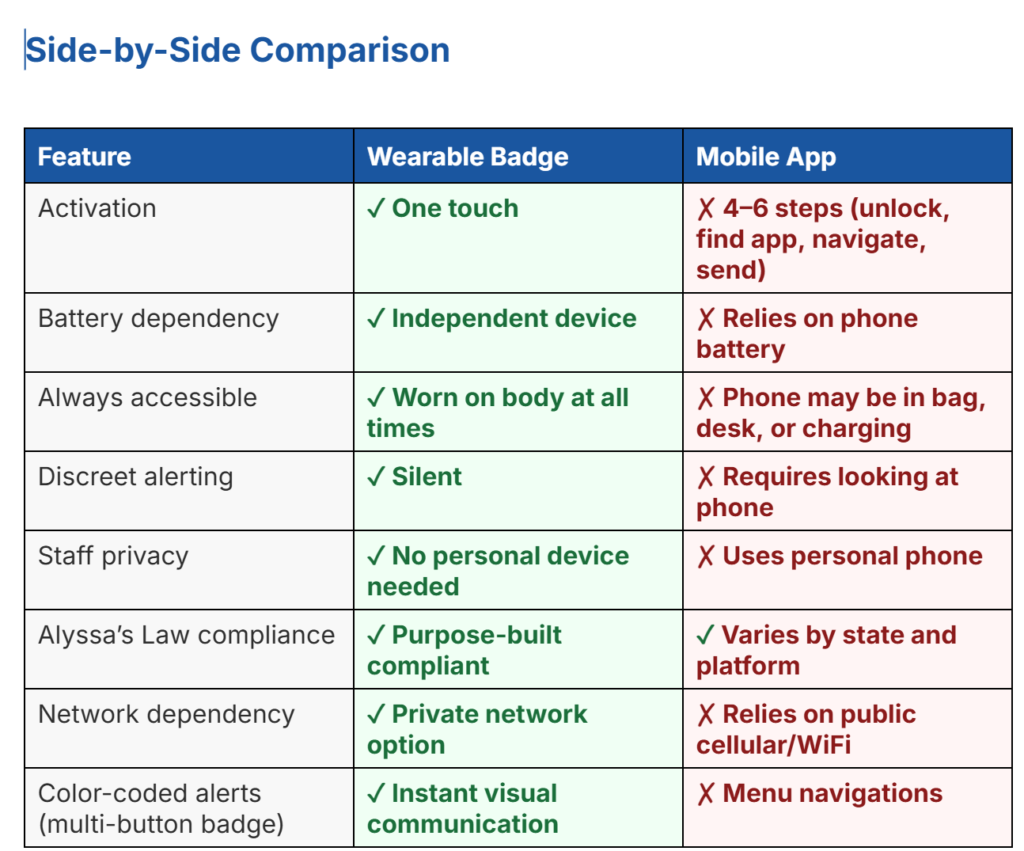
This article compares wearable safety badges and mobile apps side by side, explains why a growing number of K–12 districts are making the switch, and shows how SimulAlert®’s color-coded badge system is purpose-built for exactly these moments.
Why Mobile Apps Fall Short in a School Emergency
Mobile apps for school safety are a well-intentioned solution built on the wrong foundation. A smartphone is a general-purpose consumer device. It was not designed for split-second, high-stress emergency activation — and in practice, several consistent problems emerge.
Problem 1: Too Many Steps Under Pressure
During a crisis, stress degrades fine motor control and decision-making. Research on emergency response performance shows that cognitive overload increases dramatically when a person perceives immediate physical danger. Asking staff to navigate a phone interface in that state introduces a point of failure that wearable devices remove entirely.
Problem 2: Phones Aren’t Always Accessible
Teachers leave phones on desks, in bags, on charge, or locked in drawers. During a rapid lockdown, a phone across the room is no better than no phone at all. A badge clipped to a lanyard or shirt is always within reach.
Problem 3: Battery and Network Dependency
Mobile apps depend on phone battery life and cellular or WiFi network availability. In a real emergency, school networks can become congested or unavailable. A dedicated wearable device with its own private network communication channel is not subject to these failure points.
Problem 4: Visibility Risk
In an active threat situation, being seen reaching for and using a device could escalate danger. A wearable badge allows a staff member to trigger a silent alert with a single concealed press, with no visible screen, no sound, and no delay.
What Is a Wearable Panic Button for Schools?
A wearable panic button for schools is a purpose-built device — typically worn as a badge, lanyard attachment, or clip — that staff carry on their person at all times. When pressed, it immediately transmits an emergency alert to a central dashboard, designated staff, and — depending on configuration — directly to local law enforcement.
Unlike consumer smartwatches or phone-based apps, a dedicated wearable safety badge is engineered for a single, critical purpose: getting the right alert to the right people as fast as possible.
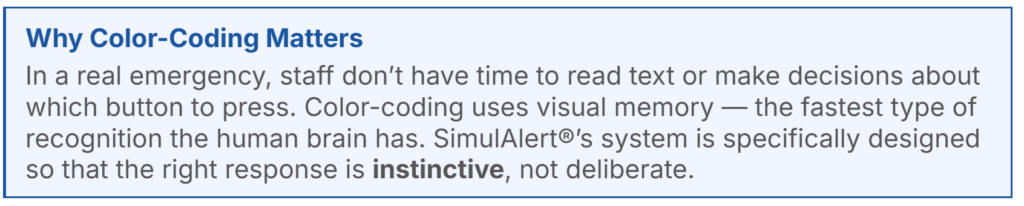
SimulAlert®’s system takes this a step further with a color-coded badge design, where each button color corresponds to a specific emergency type. This eliminates ambiguity from the alerting process entirely.
6 Reasons Wearable Safety Badges Outperform Mobile Apps
1. One-Touch Activation — No Unlocking, No Delays
The single biggest advantage of a wearable panic button is speed. There is no screen to unlock, no app to find, no menu to navigate. Staff press once and the alert transmits immediately. In high-stress situations where seconds define outcomes, removing every unnecessary step is not a convenience — it is a life-safety requirement.
2. Always On, Always Accessible
A badge worn on a lanyard is available the moment an emergency begins — whether the staff member is standing at the whiteboard, in the hallway, or in the restroom. There is no scenario in which the device is out of reach. Mobile phones, by contrast, are routinely left in locations that make them inaccessible during the first critical moments of an incident.
3. Silent and Discreet — No Escalation Risk
Pulling out a phone and visibly using it in an active threat situation can draw attention and potentially escalate danger. A wearable badge enables completely silent alerting with minimal physical movement. The press of a button is virtually undetectable, which means staff can call for help without revealing their location or actions.
4. Purpose-Built for Schools, Not Repurposed from Consumer Tech
Mobile safety apps are typically consumer products adapted for institutional use. Wearable safety badges are engineered from the ground up for school environments — tested for the specific demands of campus alerting, staff workflows, and multi-responder coordination. There is a meaningful difference between a tool designed for a task and one retrofitted to perform it.
5. Staff Privacy Protection
Requiring staff to install a safety app on their personal devices raises legitimate privacy concerns. Employees may resist, creating adoption gaps that undermine the entire system. A dedicated wearable badge requires no personal device, no personal data, and no app installation. Every staff member can be equipped with the same consistent tool from day one.
6. Designed for Alyssa’s Law Compliance
Alyssa’s Law — now enacted in more than ten states and under consideration in more than a dozen others — requires public schools to implement silent panic alarm systems that directly notify law enforcement. Wearable badge systems are purpose-built to satisfy these requirements. Mobile apps, which vary widely in architecture and reliability, often fall short of the specific technical and legal standards the law demands. For a comprehensive overview of federal resources, see the CISA school safety resources.
If your district is working toward Alyssa’s Law compliance, a wearable panic button system is the clearest path to meeting the mandate without workarounds.
How SimulAlert®’s Color-Coded Badge System Works
SimulAlert® was founded by an educator with decades of classroom experience — someone who understood firsthand that emergency systems fail not because staff don’t care, but because the tools are too complicated under pressure.
The patented SimulAlert® systems eliminates that problem with a color-coded badge in which each button corresponds to a specific emergency type:
🔴 Red: Lockdown — active threat or intruder on campus
🟡 Yellow: Medical emergency — immediate medical assistance required
🔵 Blue: Administrative — non-emergency staff assistance
🟢 Green: All Clear — situation resolved, normal operations resume
When a staff member presses a button, the SimulAlert® dashboard instantly shows the alert type, the specific location on campus, and the identity of the staff member who activated it. Responders know exactly what is happening and where — before anyone says a word.
This precision communication prevents two of the most damaging problems in school emergency response: delayed reaction because the nature of the threat was unclear, and unnecessary escalation because a miscommunication triggered the wrong protocol.
Which Schools Should Consider Wearable Safety Badges?
Wearable panic buttons are the right solution for any school/district that:
- Is working toward Alyssa’s Law compliance and needs a system that satisfies state-specific requirements
- Has staff who do not consistently carry or have access to personal smartphones during the school day
- Has experienced false alerts from existing systems (especially single-button badges) and needs more precise, intentional triggering
- Wants to eliminate ambiguity in emergency communication — ensuring responders know the emergency type and location immediately
- Operates across multiple buildings or a large campus where coordination between responders is critical
- Is replacing or supplementing an aging or wall-mounted panic button system that offers no location data or alert categorization
Districts that have already made the switch consistently report the same outcomes: faster response times, more confident staff, fewer unnecessary escalations, and a clearer chain of communication during actual incidents.
Frequently Asked Questions
Do wearable panic buttons work if the WiFi goes down?
Yes. SimulAlert® operates on a private network that is separate from the school’s general WiFi.
What happens when a staff member presses the badge by accident?
SimulAlert®’s badge design includes physical safeguards that significantly reduce accidental activation. For more on this, see our post on minimizing false alerts in school emergency systems.
Does every staff member need a badge?
Yes — and that is actually one of the advantages. Because the badge requires no personal device and no app installation, full staff coverage is straightforward. Every employee from classroom teachers to custodial staff can be equipped on day one.
Is SimulAlert® compliant with Alyssa’s Law?
SimulAlert® is purpose-built to meet the core requirements of Alyssa’s Law — silent panic alarm activation, direct law enforcement notification, and campus-wide accessibility. Because requirements vary by state, we recommend reviewing your specific state’s mandate. Download our free Alyssa’s Law Compliance Guide for a state-by-state breakdown.
How does SimulAlert® compare to other school safety systems?
SimulAlert® differentiates itself through color-coded precision — the ability to communicate the type of emergency instantly alongside the location. Most systems tell responders where something is happening. SimulAlert® tells them where and what, enabling a faster, better-calibrated response. See our full system comparison page for a detailed breakdown.
Ready to See SimulAlert® in Action?
The difference between a mobile app and a wearable panic button is not just convenience — it is the difference between a system that staff will actually use under pressure and one that introduces friction at the worst possible moment.
SimulAlert® was built by educators, for educators, with one principle at the center: every second in mind®.
If your district is evaluating school safety technology, upgrading from an outdated alert system, or working toward Alyssa’s Law compliance, we’d like to show you how the SimulAlert® badge system works in practice.

TikTok: https://www.tiktok.com/@simulalert
Instagram: https://www.instagram.com/simulalert