
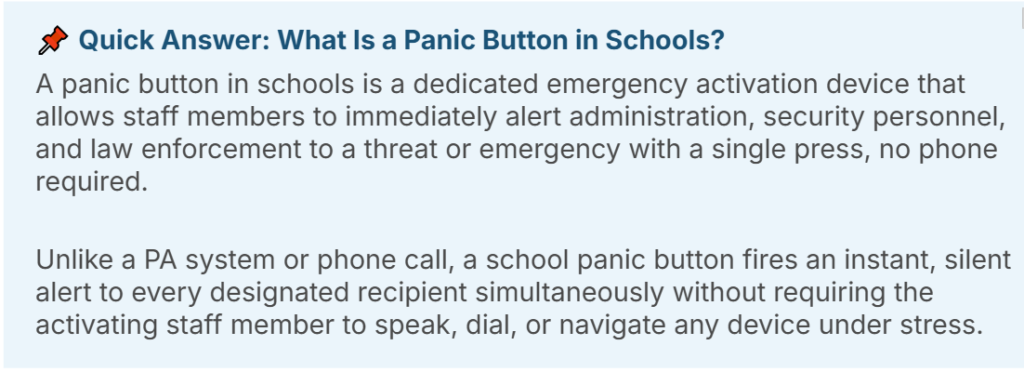
A panic button in schools is no longer a nice-to-have. In 2026, it is a legal requirement in a growing number of states, a best practice endorsed by every major school safety organization, and the single fastest way to close the most dangerous gap in any school’s emergency response plan — the seconds between when a threat is detected and when the right people know about it.
This complete guide covers everything school administrators, safety officers, and district decision-makers need to know what a school panic button is, how the four main types compare, what to look for when evaluating systems, and why the type of panic button you choose matters as much as having one at all.
Why Panic Buttons in Schools Are Now Non-Negotiable
For most of modern school safety history, the primary emergency communication tool was the PA system. A threat was observed. Someone ran to a phone or intercom. An announcement was made. Staff responded.
That chain has three critical failure points that a school panic button eliminates entirely:
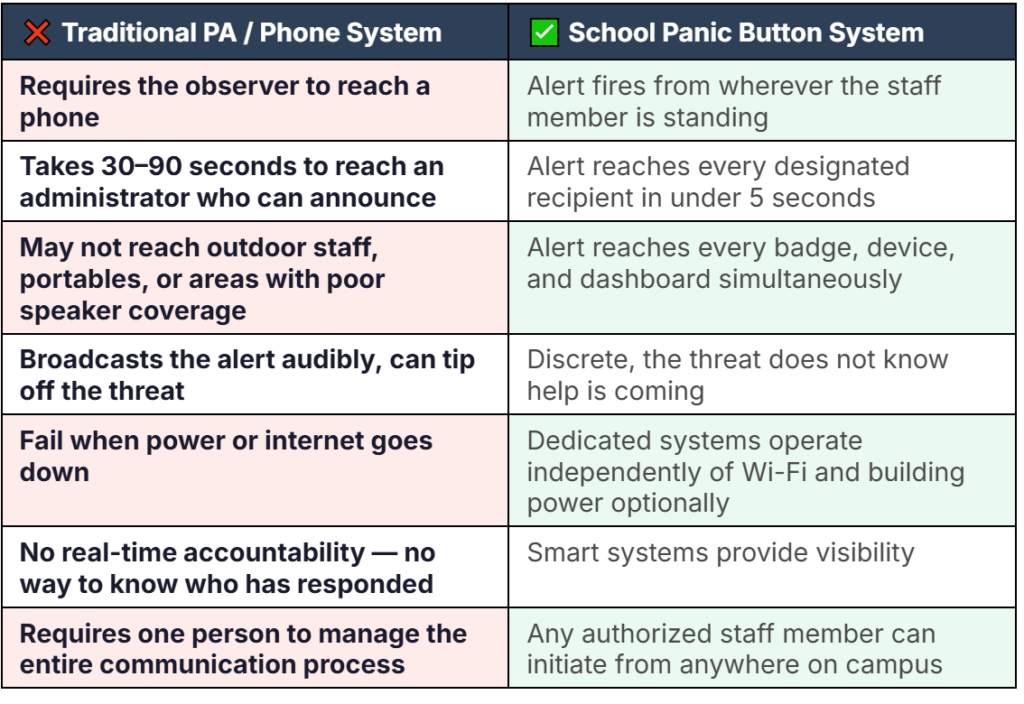
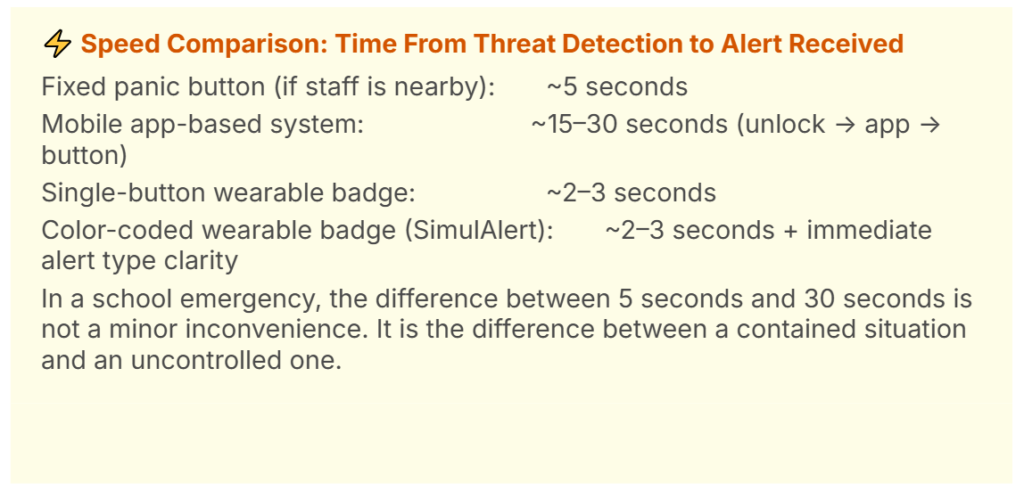
The speed difference is not marginal. In a real school emergency, every 30-second delay has measurable consequences. A school panic button system collapses the time between threat detection and coordinated response from minutes to second.
The 4 Types of Panic Buttons in Schools — Compared
Not all school panic buttons are the same. There are four primary types currently used in K-12 schools. Each has a different performance profile under real emergency conditions.

Fixed panic buttons are hardwired or wirelessly connected devices mounted in specific locations, typically under desks in classrooms, at the front entrance, or in the principal’s office. When pressed, they send an alert to a monitoring center or directly to law enforcement.
Strength: Reliable, always on, no battery dependency, easy for front-office staff to reach during a lobby confrontation.
Critical weakness: They only work if the person in danger happens to be standing next to one. A coach in a large gym, a PE teacher on the athletic field, or a custodian in the boiler room has no access to the fixed button when they need it.
Best for: Supplementary coverage at high-traffic entry points, not as a standalone solution.

App-based panic buttons turn staff personal smartphones into alert devices. Staff download an app, and pressing a designated button in the app sends an alert to designated recipients.
Strength: Staff already have their phones with them.
Critical weakness: Requires the staff member to unlock their phone, find the app, open it, and press the right button, a sequence that takes 10–20 seconds under normal conditions and far longer under extreme stress. Apps also fail when cellular networks congest during mass-casualty events exactly when they are most needed.
Best for: Low-threat administrative assists where speed is less critical.

Wearable badges with a single activation button are worn by staff members around their necks or clipped to clothing.
Strength: Fast activation. Always on the staff member’s person. No phone or navigation required.
Critical weakness: Single-button systems require staff to press the button a different number of times depending on the type of emergency. Under stress, this is almost impossible to execute correctly, and a wrong press count means the wrong response is dispatched. Worse, any accidental contact with the button triggers a full emergency response. False alarms are not a minor inconvenience. Research shows that false alerts cause measurable trauma in students and staff, with anxiety, hypervigilance, and disrupted learning that can persist for weeks after the event. A system that is easy to trigger accidentally is not a safe system
Best for: Very small, single-room operations not a full K-12 campus environment.

Color-coded wearable badge systems give staff a dedicated button for each common alert types; lockdown, medical emergency, and administrative assist, always worn on their person. This is the approach used by SimulAlert.
Strength: Combines the speed of a wearable with the clarity of a coded alert system. Administrators know immediately what type of emergency is occurring and where, enabling the correct response to begin without any investigation delay. False alarm rates drop dramatically because each button is clearly labeled and distinct.
Best for: Full K-12 campuses requiring instant, specific emergency communication across all staff roles, indoors and outdoors.
Alyssa’s Law and Panic Buttons in Schools
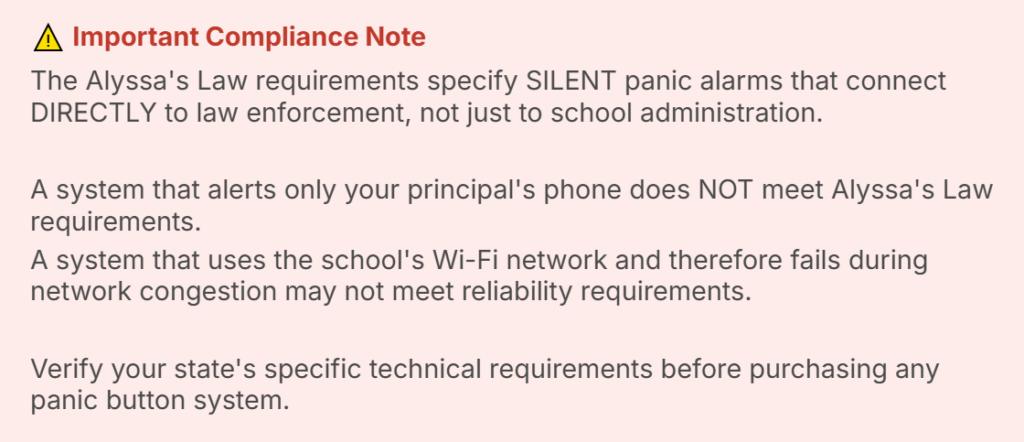
Alyssa’s Law is named in memory of Alyssa Alhadeff, a 14-year-old student killed in the 2018 Parkland school shooting. The law requires public schools to install silent panic alarm systems that directly notify law enforcement, bypassing the traditional communication chain entirely.
As of 2026, many states have enacted or introduced Alyssa’s Law or equivalent panic alarm legislation.
What a Panic Button in Schools Must Do — 7 Non-Negotiable Requirements
Not every panic button system on the market is built for the reality of a school emergency. Here are the seven requirements that separate systems that perform in real incidents from those that only perform in demos:
- Work without Wi-Fi. The moment a serious incident begins, networks congest and school Wi-Fi may be disrupted. Your panic button system must operate on a dedicated communication network that is completely independent of school Wi-Fi.
- Optionally Work without building power. Power outages frequently accompany emergencies; from active threats to severe weather events. A panic button that goes offline when the power goes out is useless precisely when it is needed most.
- Reach every person on campus — including outdoors. Your PE teacher on the athletic field, your custodian in the parking lot, and your staff in portable classrooms must receive the alert simultaneously with everyone inside the building.
- Allow any authorized staff member to activate it. The first person to observe a threat is almost never the principal. Any staff member teacher, nurse, custodian, cafeteria worker — must be empowered to initiate the alert from wherever they are standing.
- Communicate the type of emergency instantly. A lockdown alert requires a completely different response than a medical emergency. A single-button system that is prone to false alerts creates dangerous ambiguity and delays the correct response.
- Provide real-time accountability to administrators. After the alert fires, administrators need real-time situation awareness, without calling each staff individually.
- Connect directly to law enforcement. First responders must receive alert information the moment it is triggered, not after the principal calls 911. Automatic law enforcement notification cuts the most critical minutes from the response chain.
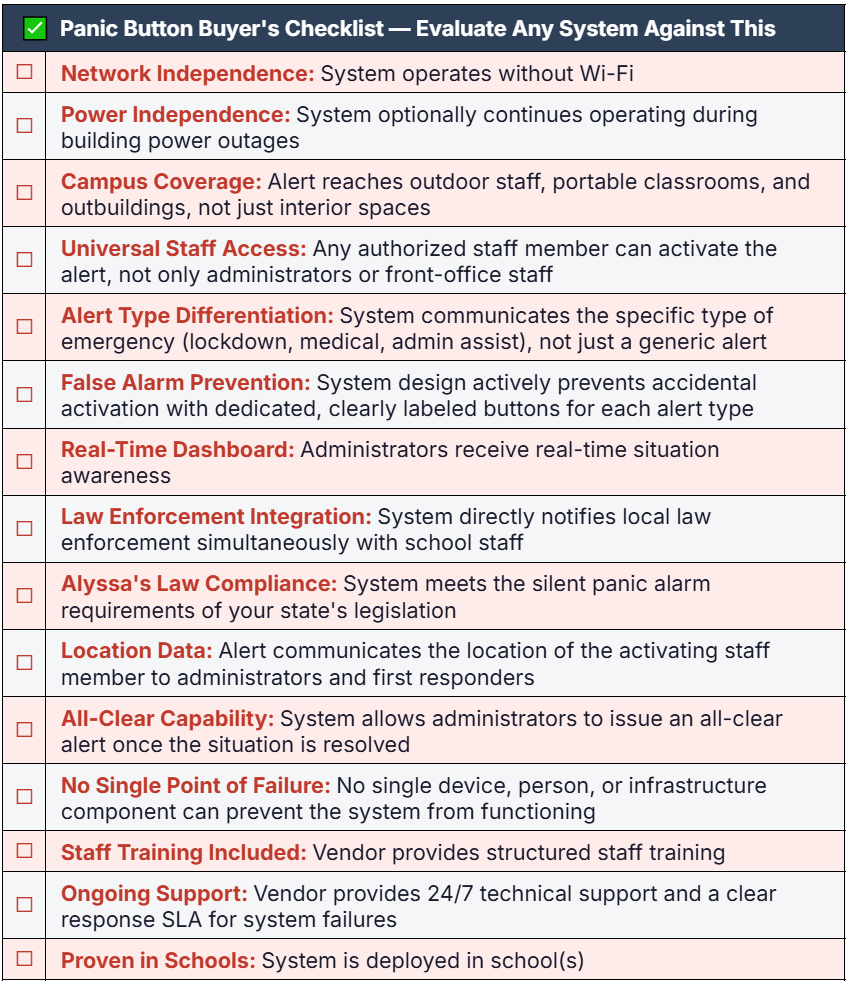
Panic Button Buyer’s Checklist — Evaluate Any System Against This
Before purchasing any panic button system for your school or district, run every candidate through this checklist:
How SimulAlert’s Color-Coded Badge System Meets Every Requirement
SimulAlert was invented by an educator. It is purpose-built for K-12 school campuses. Every design decision was made with the specific realities of a school emergency in mind.
Network Independence
SimulAlert operates on its own network. It is completely independent of your school’s Wi-Fi.
Color-Coded Badges — Instant Alert Type Clarity
Each SimulAlert badge features clearly delineated, color-coded buttons corresponding to specific alert types: red for lockdown, blue for medical emergencies, yellow for administrative assist. Staff know exactly which button to press. Administrators know exactly what response to initiate. The ambiguity that costs seconds in a single-button system is eliminated entirely.
Campus-Wide Simultaneous Notification
The moment a SimulAlert badge is pressed, every badge on campus activates, every administrative dashboard updates, and every connected device receives the alert — simultaneously. This includes staff in outdoor areas, portable classrooms, and outbuildings. No person on campus is the last to know.
Real-Time Room Accountability Dashboard
Administrators have real-time situation awareness. No more calling each classroom individually during a lockdown.
Direct Law Enforcement Notification
SimulAlert’s system notifies first responders simultaneously with school staff and provides responding law enforcement with live building status data the moment they arrive on campus. Alyssa’s Law compliant in every state where the law is enacted.
→ What Is a Code Red Lockdown in Schools? Protocols & Preparedness → Safety Plan for Students: The Complete 2026 School Guide → Alyssa’s Law & School Safety: What Districts Must Know → How Safety Badges Are Redefining School Emergency Response |
 Related Reading on the SimulAlert Blog
Conclusion: The Right Panic Button Saves Seconds, And Seconds Save Lives
A panic button in schools is not a technology investment. It is a commitment to the people inside your building that when a threat appears, every staff member has immediate access to the fastest possible response, from wherever they are standing.
The type of panic button you choose determines whether that commitment translates into action when it matters most. A fixed button that staff cannot always reach, an app that takes valuable seconds to navigate, or a single-button system that is prone to false alerts; these are worth examining carefully before committing. The goal is a system that works as well under pressure as it does in a demo.
Your staff deserve a system they can trust completely in the worst moment of their professional lives. That is the standard SimulAlert was built to meet.
Request a SimulAlert Panic Button System demo or Download Free Resources School Lockdown Tabletop Exercise: Free Facilitator Guide |